More Support for Your Germ DM Button
A month ago when we announced that Germ now launches directly from Bluesky user profiles, we also shared our developer guidance for bringing this feature into your own AT Protocol app.
Since the launch, a few teams have asked us for images and suggested language for describing Germ. We’ve designated a new channel in our Discord, #dev-support, for your implementation questions. Please hit us up there or via email at any time.
We wanted to share a few more resources to help your users seamlessly jump into end-to-end encrypted messaging on Germ.
*
As you know, Germ DM is an end-to-end encrypted messaging app for iOS. Users can use their atproto handles for secure messaging in Germ, and atproto (aka appviews) can implement a button that lets people launch Germ DMs directly from other people’s profiles.
The Germ DM button starts a new message to a given user in the Germ DM app. Teams are already bringing the button into their apps, as Germ becomes the secure messaging companion app for the Atmosphere.
Here’s how the Germ button looks today on Bluesky, Blacksky, and proto IM:
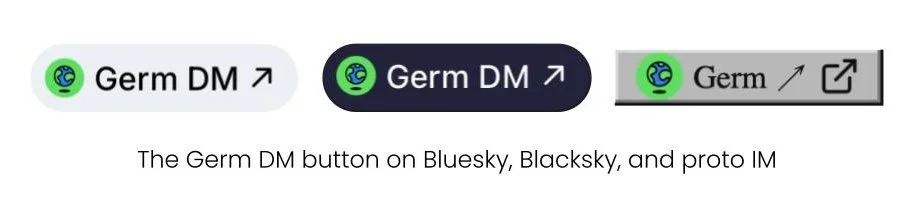
A user Alice defines in the Germ app who she allows to message her, and you can determine this by parsing the Germ declaration (see spec). You should only show Alice’s Germ button to users who can message her.
Germ is currently only available on iOS. You can choose to show the button only to iOS users, or use the platform hint section of the spec to send users to an appropriate landing page.
*
When building your own Germ DM button, we encourage you to include our floating earth logo on its green background. Download it here. If your UX needs a different visual treatment, please contact us for alternatives.
Looking for instructional copy for your users?
Here’s some language that describes what the Germ button is doing in your app:
Germ DM is an end-to-end encrypted messenger for totally private messages. Click the button on a friend’s profile to DM them! Want people to be able to Germ DM you? Get set up in Germ. (Download here.)
E2EE messages are not readable by Germ, [Your App], Bluesky, or any other service provider.
Here’s some language you can use for when a user clicks the Germ link on a friend’s profile for the first time.
Your friend is using Germ DM, an end-to-end encrypted messenger for totally private messages. Click the button to DM them!
E2EE messages are not readable by Germ, [Your App], Bluesky, or any other service provider.
You might also want to link to our App Store listing.
We look forward to seeing your Germ button! Reach out with your questions anytime - on atproto @germnetwork.com, by email, or on Discord.